Showing posts with label international schools. Show all posts

Tuesday, 22 April 2014

Note taking skills for students

In a fast-paced world where information travels at the speed of light, note taking skills can make all the difference between effective and ineffective learning. Students can perform way better if they master the art of note taking. In this regard, I am sharing with you this wonderful note taking workshop prepared by Learning Commons which features the 6 important note taking skills students need to develop together with the different methods of taking notes and concluding with the five Rs.

Note taking skills summarised in the handy acronym LISTEN. Listen stands out for :
  • L:Lead
  • I: Ideas
  • S: Summarise
  • T: Talk
  • E: End
  • N: Notes

1- Lead:
Lead entails doing course reading ahead of time and being prepared for the lecture topic.

2- Ideas
Seize upon main ideas instead of writing everything down.

3- Summarise
Summarise the most important information and significant ideas in your own words within 24 hours of each lecture.

4- Talk
Talk to your teacher and classmates to discuss ideas.

5- End
End each lesson or lecture by reviewing and summarising notes, identifying any problems that you might need to ask about.

6- Notes
Take down only essential points and listen for signal words or important concepts.
Contact Us -


Phone - +91-731-2401952

Skype - mschools, linkites


                                                                    Find us on Facebook  Follow us on Twitter  21_blogger  Follow us on Google+


Powerful New Citelighter Tools (Plus An Edudemic Giveaway!)

Do you guys remember Citelighter? We mention it here from time to time because we think it is a pretty awesome tool that can be useful in many of your classrooms. They started out as a pretty simple tool to help students build bibliographies. Then they added Cognitive Prints to help teachers analyze students’ research and writing process.
Well, they’re still going at it – they continue to build on their already-great tool and add more features.
Today, they’re announcing a new teacher template creator, student outlining tools, and a teacher assessment platform.

A Freebie?! Yes, Please!

Not only that, but because the guys over at Citelighter know that Edudemic readers are at the top of their teaching game, they’re offering a freebie to Edudemic readers only!

The first 50 teachers that email team@citelighter.com with subject line ‘I heart Edudemic’ will receive free access to theentire suite of student and teacher tools until the end of year for free.

Citelighter will spend an hour with you showing you how to set-up your classes, and even show you what they are building over the summer. So you don’t have to have used Citelighter’s tools in the past to make this work in your classroom -they’ll help you! Give them a shout and try it out!
citelighter_logo

Today’s News From Citelighter

Citelighter knows how important it is for students to learn how to organize and effectively communicate their ideas. It is the cornerstone of 21st Century skills. They also understand the struggles associated with teaching students how to write well, especially considering the complexity of new writing standards. After spending thousands of hours with teachers and students, Citelighter is excited to release their newest installment of student and teachers tools.  This new all-purpose writing platform adds even more to an already impressive six-time award-winning research and writing tool.
The team doesn’t view writing instruction as a set of discrete processes, but rather a continuum where teachers must engage with students at the moment they are struggling. The new platform supports teachers and students alike with tools to create, draft, and edit writing tasks, which provides guidance, a sense of transparency, and collaborative opportunities throughout the entire writing process. This makes Citelighter the most comprehensive assessment platform available. The new tool includes:

Contact Us -


Phone - +91-731-2401952

Skype - mschools, linkites


                                                                    Find us on Facebook  Follow us on Twitter  21_blogger  Follow us on Google+


Friday, 18 April 2014

Ways To Show Your iPad On A Big Screen In Class

One of the versatile ways to use iPad in class is through sharing your iPad screen with your students. You can easily mirror your iPad screen to a projector and let students see what you see on your iPad. This can be used when sharing tutorials, presentations, illustrations and several other learning tasks. How to do it is what I want to share with you today.


image cropped from ' iPad as The Teacher's Pet '


There are actually two ways you can show your iPad on a big screen: wirelessly or through using a cable. Below are some of the tools that you can use either wirelessly or via cable to display your iPad on a big screen. I have copied these tools from Tony Vincent's new wonderful graphic "iPad as The Teacher's Pet". I highly recommend that you check that visual guide for more apps and tips on how to use iPads with your students.

Wirelessly:
This method requires devices to be on the same WiFi network. Networks must have open ports for Airplay. The tools to use wirelessly for iPad mirroring are :


Connect an Apple TV to your projector and use iPad's Airplay feature to mirror. Requires HDMI or HDMI to VGAadapter.


Install software on your projector-connected computer and use iPad's AirPlay feature to mirror the screen.


Contact Us -


Phone - +91-731-2401952

Skype - mschools, linkites


                                                                    Find us on Facebook  Follow us on Twitter  21_blogger  Follow us on Google+


Saturday, 12 April 2014

Effective Ways To Build Your School Tribe


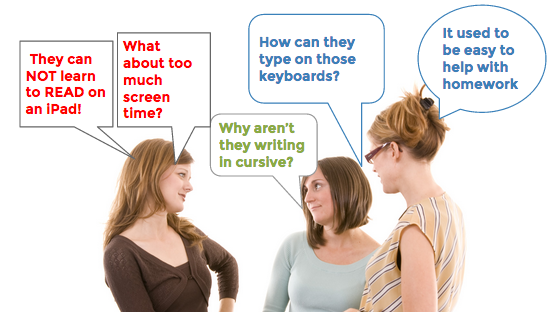
It’s a crisp fall Monday morning, and freshly dressed school children are being dropped off by their parents – who by this time have gotten used to the current homework load and the personality of the new teacher. But this year, there is something different in the air; an angst that is causing mothers throughout the 4th grade to call each other and fuel the creation of new urban myths about iPads that their children are using in school.
The phone calls sound something like this…
It used to be so easy to help with a worksheet or two at night. I don’t really know how to help my child learn and organize? And why isn’t my 4th grader writing in cursive? How are these kids expected to type effectively on that iPad keyboard? What are we doing to this generation of kids? When are they going to learn to read, and how will they ever learn to read on the iPad?  My child needs books, like I used, and a organization planner. How do I know they are not just playing games when they are on that thing?
Screen Shot 2014-03-12 at 10.10.04 AM.png
These questions echo from cell phone to cell phone, and car window to car window as parents voice their concerns to each other. This starts an almost frenzy-like atmosphere of distaste for the new 1:1 iPads. Why does this type of agitation happen? In most cases, it is a spurred by two factors: a big school-wide change to the status quo, and a lack of effective communication from the school.
Unfortunately, this is what can happen if you try to change the direction of a school without involving the parents. This is a semi-fictional account of something that happened at my own school, so when it happened I turned to one of the most brilliant business mind: Seth Godin


Contact Us -


Phone - +91-731-2401952

Skype - mschools, linkites


                                                                    Find us on Facebook  Follow us on Twitter  21_blogger  Follow us on Google+


Google Has Changed Student Research

You know how some days, you feel older than others? I always tend to feel old when I look at education trends and examine just how far technology has come since I was in graduate school (which really doesn’t feel that long ago).  Even though I was in graduate school during the late 2000′s,  many things still had not made the jump to being technology based. Many things weretech based, but some of the big stuff – like research- had only come about halfway.
While I certainly wasn’t sifting through paper records to find out what library had the books I needed for a lit review, I still had to call the library to order them (they didn’t let you request interlibrary loan online at that time), wait for the physical books to arrive, and then schlep them home to sift through them. I’m sure many of you have the same reaction to this as I do – blech. 
just-google-it-how-google-has-changed-research-for-grad-students_5307b1f4a7fd6


Contact Us -


Phone - +91-731-2401952

Skype - mschools, linkites


                                                                    Find us on Facebook  Follow us on Twitter  21_blogger  Follow us on Google+


Wednesday, 9 April 2014

Apps To Supercharge Your Classroom Productivity

Apps To Supercharge Your Classroom Productivity


When you are looking to improve your productivity half the battle is finding the will. The other half is discovering and refining a system that will maximize your time and make you the most efficient you possible!
These 5 apps all perform a slightly different functions, and when you combine them together they can supercharge your classroom productivity. They keep you updated on your to-dos and keep all of your ‘stuff’ in one place. You’ll waste less time and worry less, have less of a mess, and be more organized!

Evernote

Evernote is an extremely versatile app that can be used in a number of ways. It is a cloud based notebook that works across platforms and can be used to organize the mass of information you need to keep track of. You can use it for lists, saving web files for later viewing, organizing research or managing projects.
The beauty of Evernote is not in the quality of each individual function. The beauty is in the fact that it has such a wide range of functions and can be used for just about anything. This way you can keep everything in one place.

Week Plan

Week Plan is an app based on the time management system outlined by Stephen Covey in “The 7 Habits of Highly Effective People.” The theory is that you should plan your important tasks and to do lists on a week by week basis, rather than day by day. This way you can take a step back and ensure you make time for the really important stuff, without the day to day to do list swamping you.
The app gets you to set priorities for each of the different roles you have in life such as teacher, student, sportsperson, part time worker, family member etc. Once you determine the week’s priorities you can then allocate them to the days of the week.
If it sounds simple, it is. But it will revolutionize the way you manage your time.

My Study Life

My Study Life is an app that allows you to program in your class timetable. You can then assign any notifications or information specific to each class and use it to track tasks and deadlines. It will let you know what is coming up and when things are due.
It is intuitive and easy to use and an excellent way to separate your classroom planner from the rest of your life if that is what you prefer. It is great for both students and teachers, especially for those teachers who teach a wide variety of classes with different things due at different times.

Dropbox

The ultimate storage in the cloud system that allows you to access your files from anywhere. This is particularly useful if you are not using your own device and are using computers on campus. This way the cloud will allow seamless workflow from campus to home.

Remember The Milk

This is the ultimate “to-do list” app. It works across platforms and you can sync it with Evernote if you use that as well. However Remember the Milk is good enough to stand on its own two feet.
You can create multiple lists and its features include giving tasks priorities, time estimates and locations. With this app you will be able to keep track of both the mundane and important tasks.

Contact Us -


Phone - +91-731-2401952

Skype - mschools, linkites


                                                                    Find us on Facebook  Follow us on Twitter  21_blogger  Follow us on Google+

Tuesday, 8 April 2014

Internet Is Changing Education

How Is The Internet Changing Education?


The internet has brought many wonders to our lives. I don’t know about the rest of you, but I don’t get lost much anymore (thanks to my Google Maps app), I never have to look up hot spots for meals ahead of time when I travel (thanks, Yelp), and when I want to know more about something, I can take my phone out and find the information I’m looking for.
The internet has brought great things to education, too. Research is easier, for sure. And online learning is bringing education options in varying ranges of affordability to a much wider audience. The handy infographic below takes a look at how educational power is shifting away from the hands of the institutions and more into the hands of students. Keep reading to learn about some of the milestones of e-learning, the current state of the internet and education, and what changes the internet is making happen.

How Is The Internet Changing Education?

  • In 1971, The Open University in England begins broadcasting lectures on TV
  • The now well known Univ. of Phoenix opens in 1989
  • The term e-learning was coined in 1999
  • Online education is currently a $34 billion industry
  • The Open University is now the UK’s largest with 250,000 students
  • The University of Phoenix is the largest in the US, with more than 500,000
  • Khan Academy has over 41 million views on its courses
  • Online learning can offer more personalized learning options
  • Students can learn at their own pace, taking as many or as few classes at a time as they choose
  • There are fewer one size fits all lecture based courses
  • The London School of Business and Finance offered an MBA delivered entirely through a Facebook app
internet-revolutionizing-education-small


Contact Us -


Phone - +91-731-2401952

Skype - mschools, linkites


                                                                    Find us on Facebook  Follow us on Twitter  21_blogger  Follow us on Google+